

Table of Contents
Integrating an Applicant Tracking System with local job portals and the WhatsApp Business API automates candidate communication by using middleware to parse applicant data and trigger instant messaging workflows. This architecture reduces time-to-contact from days to seconds, ensuring recruitment teams engage qualified candidates before competitors while maintaining centralized data compliance.
What Are the Core Evaluation Criteria for Recruitment Automation?
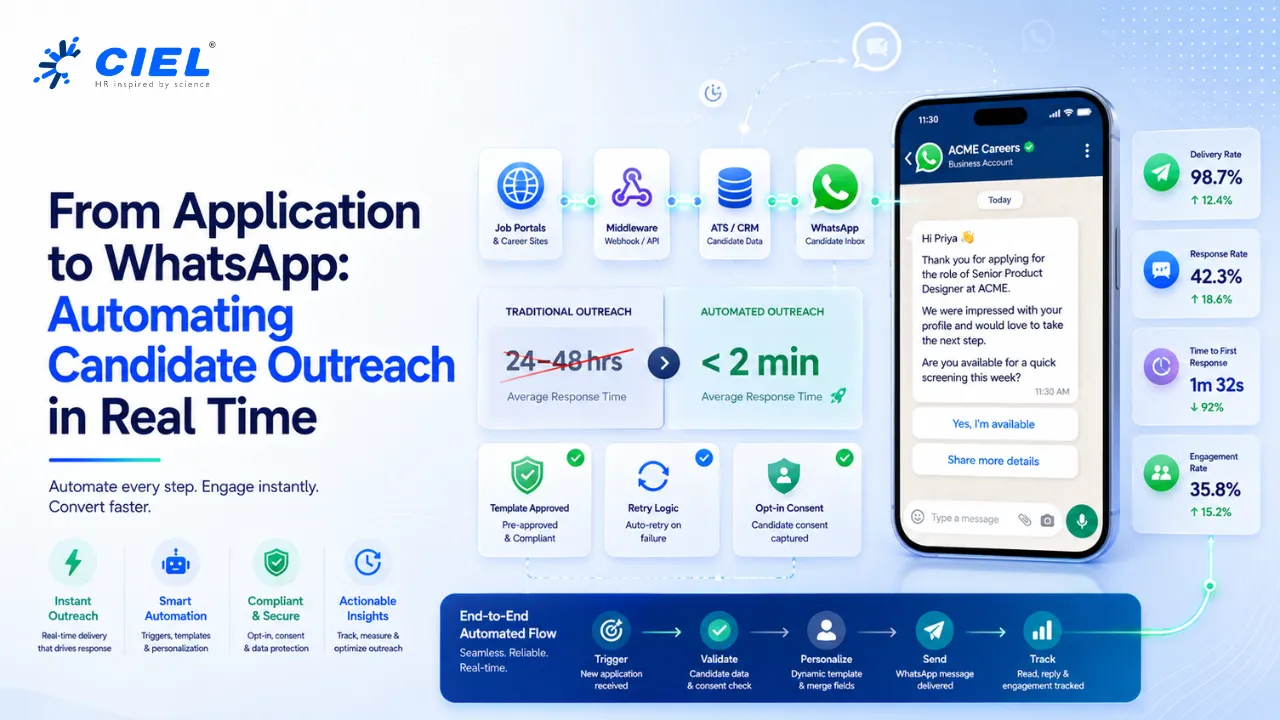
Middleware platforms connect an Applicant Tracking System to disparate local job portals by translating varying data payloads into standardized webhooks. This standardization allows recruitment operations to trigger automated WhatsApp Business API templates the moment a candidate applies.
Many recruitment teams evaluate automation tools based solely on interface design, ignoring underlying API rate limits and webhook reliability. When analyzing what are the main challenges when integrating job boards that don’t have a direct API, data latency emerges as the primary failure point. Systems must rely on email parsing or scheduled CSV scraping when native endpoints are absent. Teams must evaluate solutions based on payload parsing capabilities, endpoint resilience, and template approval workflows rather than superficial dashboard features.
How Do Teams Choose the Right Middleware for ATS Integration?
Integration platforms route candidate data from job boards into an Applicant Tracking System while simultaneously triggering external communication endpoints. This multi-step routing ensures that candidate records update in real-time while triggering compliance-approved outreach.
Determining how to choose the right middleware like Zapier or Make for ATS integration depends heavily on candidate volume and data complexity. Zapier offers rapid deployment for standardized endpoints, while Make provides visual branching logic for complex data transformations. Operations processing over 10,000 monthly applications require middleware that supports parallel execution and automatic failover.
- API Rate Limit Tolerance: Maximum requests per second > 50 = PASS. < 50 = HIGH RISK for volume spikes.
- Webhook Latency: Processing delay < 2 seconds = PASS. > 5 seconds = FAIL (risks candidate drop-off).
- Error Handling: Automated retry logic present = PASS. Manual intervention required = FAIL.
What Is the Cost of Poor Integration Evaluation?
The talent acquisition team at a regional logistics enterprise spent three months deploying a custom webhook connection between their Applicant Tracking System and three local job portals. The evaluation committee prioritized upfront licensing costs over payload mapping capabilities. They assumed the middleware would seamlessly translate the varying candidate schemas from each portal into their centralized database.
During the peak holiday hiring surge, the system encountered an unexpected data format from a primary local job portal that lacked a native API endpoint. The portal relied on email parsing to transmit applicant profiles. Because the evaluation team did not test for unstructured data ingestion, the middleware failed to map the phone number fields correctly.
Hundreds of qualified driver applications landed in the database without valid contact numbers, silently failing to trigger the automated WhatsApp Business API outreach templates. The recruitment team believed the applicant volume had dropped, while competitors actively poached the available drivers. A proper evaluation of data transformation capabilities and error-handling thresholds would have flagged the parsing failure immediately, routing the flagged profiles to a manual review queue instead of losing the candidates entirely.
How Does an Automated ATS Workflow Compare to Traditional Methods?
An automated recruitment workflow utilizes webhooks to synchronize candidate data across platforms instantly, eliminating manual data entry. This programmatic synchronization reduces the time-to-contact metric by up to 70% compared to batch processing.
| Feature | Automated Workflow Architecture | Traditional Manual Processing |
|---|---|---|
| Data Ingestion | Real-time webhook delivery | Batch CSV uploads or email parsing |
| Candidate Outreach | Instant WhatsApp Business API trigger | Manual email or phone call |
| Error Handling | Automated retry and alerting | Silent failure requiring manual audits |
| Time to Contact | < 2 minutes | 24 to 48 hours |
Evaluate your current integration architecture to identify latency bottlenecks in candidate outreach.
What Are the Trade-offs of Implementing WhatsApp Automation?
The WhatsApp Business API enforces strict 24-hour messaging windows and template pre-approvals to prevent spam, requiring companies to design highly specific conversational flows. These constraints ensure high engagement rates but limit spontaneous or unstructured recruiter outreach .
Organizations must navigate specific trade-offs when deploying this architecture. Template approval requires strict adherence to Meta’s promotional guidelines. Costs fluctuate based on conversation categories, typically ranging from $0.015 to $0.08 per user-initiated or business-initiated session. Furthermore, data privacy regulations mandate explicit opt-in consent captured at the job portal level before any automated payload triggers a message.
What Are the Steps to Connect an ATS to WhatsApp?
Event-driven architecture links the Applicant Tracking System to the WhatsApp Business API by mapping specific status changes to predefined message templates. This configuration ensures that moving a candidate to the interview stage automatically dispatches scheduling links to their mobile device.
Teams looking for a step-by-step guide for connecting an ATS to WhatsApp for instant candidate communication must first configure API keys, define webhook listener URLs, and map the JSON payload fields between the platforms. Development teams must validate the data payload to ensure the candidate’s phone number includes the correct country code before the middleware executes the POST request. Understanding how to set up an automated workflow between a local job portal, an ATS, and WhatsApp requires rigorous testing of edge cases, such as missing fields or malformed data arrays.
Review your current job portal data schemas to ensure compatibility with middleware webhook ingestion before provisioning API access.
Frequently Asked Questions
How do integration platforms connect with local job portals lacking a direct API?
Integration platforms utilize email parsing tools or scheduled secure file transfer protocols (SFTP) to extract candidate data. The middleware then transforms this unstructured data into a standardized JSON payload for the Applicant Tracking System.
What is the expected ROI timeframe for implementing WhatsApp Business API in recruitment?
Organizations typically observe a positive return on investment within 3 to 4 months. The cost savings stem from reduced manual outreach hours and a decrease in candidate drop-off rates due to instant engagement.
How does the middleware trigger a WhatsApp message from an Applicant Tracking System?
The middleware monitors the Applicant Tracking System for specific status changes via webhooks. When a status updates, the middleware extracts the candidate’s phone number and sends a POST request to the WhatsApp Business API endpoint containing the approved template ID.
What data privacy rules apply when sending automated WhatsApp messages to job applicants?
Regulations like GDPR and CCPA require organizations to obtain explicit, documented opt-in consent from candidates before initiating contact. This consent must be captured at the point of application on the local job portal and passed through the webhook payload.
What are the costs associated with using the WhatsApp Business API for hiring automation?
Meta charges per conversation based on the category of the message. Utility or authentication conversations generally cost between $0.015 and $0.08 per 24-hour session, depending on the destination country code.
What are the best practices for creating WhatsApp message templates for recruitment that get approved?
Templates must use clear, transactional language without promotional phrasing. Best practices dictate including clear variables for candidate names, stating the specific role applied for, and providing a direct opt-out command within the message body.
